How to Protect Your Phone from Hacking, Spying and Viruses (Complete Guide)
🛡️ How to Protect Your Android and iPhone from Malware, Surveillance, and Hacking: Essential Tips and Steps (2026 Guide)
In 2026, your smartphone is no longer just a communication tool—it's a vault for your most precious secrets: photos, messages, banking data, and even your digital identity. As hackers' methods evolve, protecting your phone has become an absolute necessity. In this comprehensive guide, we'll take you through a complete journey to protect your phone from hacking, spying, and viruses.
🚨 1. The Biggest Security Threats in 2026
Before we learn how to protect ourselves, we need to know what we're up against. Security threats have evolved significantly.
🔹 Data-Stealing Apps (Malware)
There are apps that appear as useful tools (like "memory cleaners," "battery savers," or flashlights) but in the background, they collect your data and send it to unknown servers. Modern operating systems no longer need these fake cleaning apps—they only drain your battery and violate your privacy. According to Kaspersky, Android threats nearly doubled in 2025, with malware primarily distributed through messaging apps, with malicious files sent in private messages and group chats.
🔹 NFC Skimming and Relay Attacks
With the spread of contactless payments, new attacks have emerged targeting NFC technology. In direct NFC relay, scammers contact victims via messaging apps and convince them to download a fake "bank verification" app. The victim is then asked to tap their physical bank card against the back of the phone and enter their PIN—instantly sending card data to criminals. Reverse NFC relay is more complex: victims are tricked into setting a malicious app as their default contactless payment method, then persuaded to visit an ATM with their infected phone to "transfer money to a secure account"—which actually sends funds directly to the scammer's pocket.
🔹 AI-Powered Phishing (Vishing & Smishing)
Artificial intelligence can now create fake text messages and voice calls that mimic your friends' or bank employees' voices with high accuracy. These attacks—known as "Vishing" (voice phishing) and "Smishing" (SMS phishing)—are evolving rapidly.
🔹 Pre-Infected Devices (Firmware Trojans)
Even cautious users can fall victim. In 2025, cases were reported worldwide where devices already contained trojans when unboxed—typically smartphones from unknown manufacturers or knockoffs of famous brands. The sophisticated Triada malware integrates directly into smartphone firmware and can only be removed by flashing a clean OS. It can steal access tokens and passwords, intercept SMS messages (including confirmation codes), and even run a proxy on the phone for attackers to browse the web using the victim's identity.
🔒 2. New Android Security Features (2025-2026)
Google has launched revolutionary security updates to protect Android users from theft and hacking. These features are available on Android 16 and later versions.
🔹 Identity Check
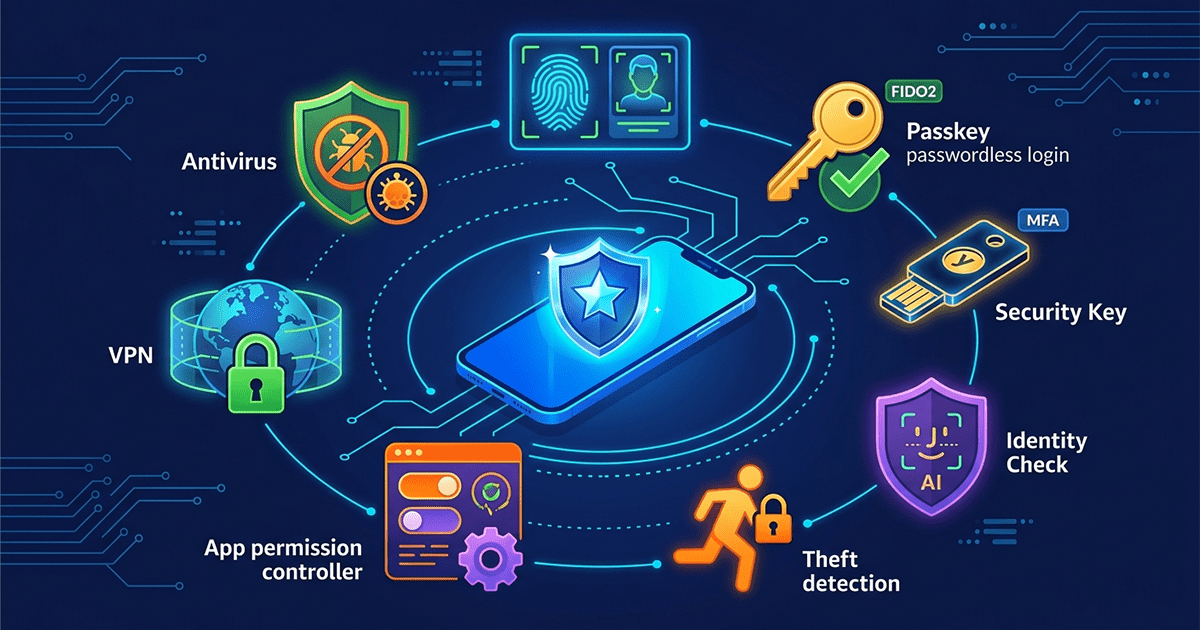
This feature is your strong shield. It enforces biometric authentication (fingerprint or face) when accessing sensitive apps or changing security settings from untrusted locations. Even if a thief knows your PIN, they cannot access banking apps or password managers without your biometrics. This feature has been expanded to cover all apps using Android's Biometric Prompt, including Google Password Manager and third-party banking apps.
🔹 Failed Authentication Lock
If someone tries to guess your PIN multiple times, the phone automatically locks itself. Google improved this feature by not counting repeated attempts of the same wrong number (like a child tapping the screen), preventing accidental lockouts.
🔹 Remote Lock
You can now lock your stolen or lost phone from any web browser via android.com/lock. An additional verification layer ensures that you are the real owner.
🔹 Theft Detection Lock
This feature uses on-device AI to detect "snatch and run" motion. If someone tries to grab your phone and run, the phone instantly locks to protect your data.
🔹 Sideloading Restrictions (Starting 2026)
Google announced that starting September 2026, all apps installed outside of Google Play must be registered by a verified developer. This is because users are 50 times more likely to install malware when installing apps from internet-sideloaded sources. Unsigned apps will only be installable via a superuser mode.
🔐 3. Account Security Basics: FIDO & MFA
Password alone is no longer enough. The Cybersecurity and Infrastructure Security Agency (CISA) recommends strong steps to secure your accounts.
🔹 Stop Using SMS for Two-Factor Authentication
SMS messages are unencrypted and can be easily intercepted. Hackers can also execute "SIM swapping" attacks—impersonating you to convince your phone provider to transfer your number to their SIM card, intercepting all your codes in minutes. Security experts now advise against using SMS 2FA because SIM-swapping attacks are on the rise.
🔹 Use Passkeys
Passkeys are the secure alternative to passwords. They rely on your fingerprint, face, or PIN to log into your accounts and are resistant to phishing attacks. They leverage your phone's biometrics to create a one-of-a-kind access token.
🔹 Physical Security Keys (FIDO2)
If you're a high-profile individual or want maximum security, physical keys like YubiKey or Google Titan are the best option. They cannot be hacked remotely and offer complete protection against phishing, as they are cryptographically locked.
📱 4. Protecting Your iPhone from Hacking
Although iOS is relatively more secure, it is not immune to attacks. Here are the most important iPhone-specific tips.
🔹 Enable Lockdown Mode
This feature is designed for individuals at risk of targeted digital attacks (journalists, activists). It disables many features that could be security vulnerabilities. In iOS 19, Lockdown Mode gets smarter with AI-triggered threat suggestions and customizable profiles.
🔹 Keep iOS Updated
Keeping your software up to date is the single most important thing you can do to maintain your Apple device's security. Security researchers recently identified web-based attacks targeting out-of-date versions of iOS through malicious web content. If you have kept your iPhone software up to date, you are already protected.
🔹 Review App Permissions Regularly
Go to Settings > Privacy & Security and review which apps have unnecessary access to your location, contacts, or camera.
🔹 Enable Stolen Device Protection
This feature prevents a thief from changing your Apple ID password even if they know your phone's passcode, by requiring biometric authentication.
🧹 5. Apps You Should Delete Immediately
Certain types of apps pose a risk to your privacy and device security. If you find any of these, delete them immediately.
- Memory Cleaners & Phone Boosters: Useless on modern devices and often act as spyware.
- VPN Apps from Unknown Sources: Many free VPNs track user locations and use unreliable encryption, leaving user data exposed. There has been a strong increase in malicious apps masquerading as legitimate VPN services.
- Outdated Apps: Any app that hasn't received an update in over a year poses a serious security vulnerability.
- Apps Requesting Illogical Permissions: A flashlight app asking for contacts or location? Delete it immediately.
⚙️ 6. Advanced Privacy Settings
Some hidden settings can make a big difference.
🔹 Disable Personalized Ads
Go to Settings > Google > Ads, and enable "Delete advertising ID" or "Opt out of ads personalization."
🔹 Restrict Background Apps
On Android: Go to Developer Options and reduce the number of background processes. On iPhone: Disable "Background App Refresh" for unnecessary apps.
🔹 Disable 2G (Android 16)
Android 16 allows you to block 2G networks, which immediately prevents risks related to cell tower simulators and unencrypted networks.
🔹 Enable Biometric Authentication for Every Sensitive App
Banking apps, email, and password managers offer the option to lock the app with fingerprint. Enable it for all of them.
✅ Summary: Weekly Checklist
Follow these simple steps weekly to ensure your phone remains protected:
- Review installed apps – Delete what you don't use.
- Review app permissions – Remove unnecessary permissions.
- Install system and app updates – Most security updates patch critical vulnerabilities.
- Don't click suspicious links – Especially those asking you to "confirm your data."
- Don't install apps from outside official stores – This is the most important rule.
In a digital world full of risks, awareness is your strongest protection tool. By following these guidelines, you'll turn your phone into a fortress that's hard to breach. Share this guide with your loved ones to protect them too.