PWM Dimming vs DC Dimming: Which Is Better for Your Eye Health? - Complete Guide
👁️ What Are PWM Dimming and DC Dimming on Smartphone and Tablet Displays? Differences, Eye Comfort and How to Choose a Screen
Do you suffer from headaches or eye strain after using your phone for a short time? Do you feel a heaviness in your eyes when reading at night? The problem may not be your eyes—it may be how your phone's screen works. There are two main technologies for controlling screen brightness: PWM Dimming and DC Dimming. The difference between them can make a significant difference in your comfort and health. In this guide, we'll explain each technology, reveal their real impact on your eyes, and help you choose the phone that's best for you.
🔬 1. What Is PWM Dimming?
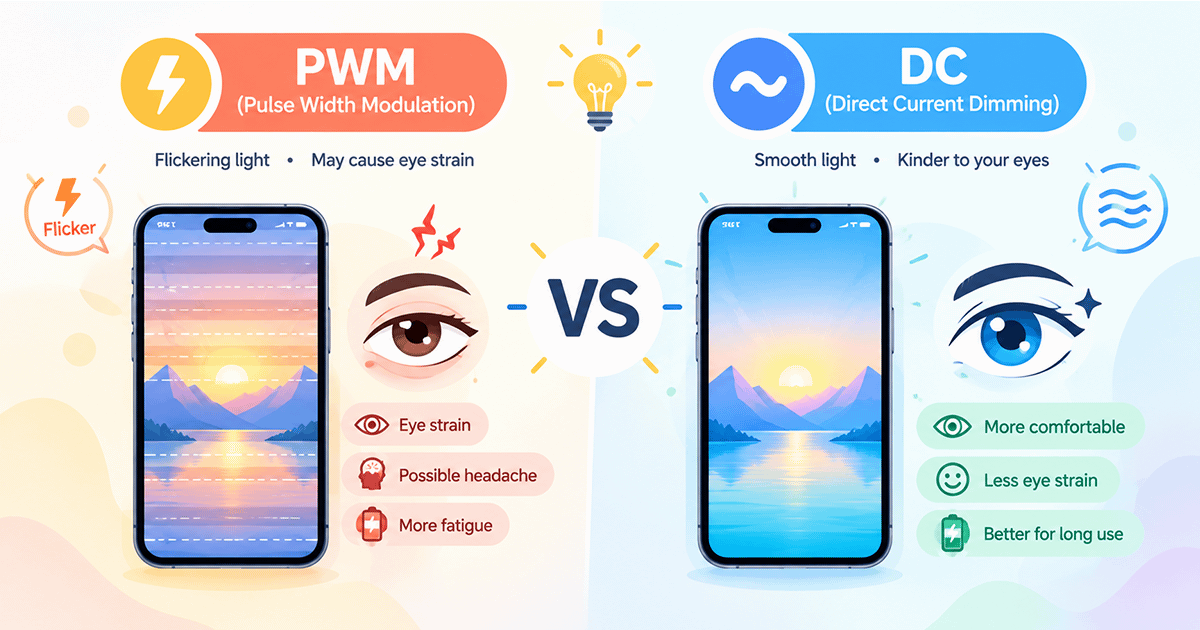
PWM stands for Pulse Width Modulation. It is the most common technology in modern OLED and AMOLED displays. Instead of reducing the electrical voltage to lower screen brightness, this technology turns the screen on and off at extremely high speeds, so fast that your eye cannot perceive the flicker.
How exactly does it work? Brightness is controlled by changing the duty cycle—the proportion of time the screen is on versus off. At maximum brightness, the screen stays lit all the time. When you lower the brightness, the screen begins to turn off and on rapidly, with longer off periods and shorter on periods, creating the illusion of lower brightness.
Why is PWM used? Because OLED screens cannot simply lower brightness by reducing voltage—that would affect color accuracy and image stability. So, turning them on and off rapidly is the optimal solution for maintaining image quality and power efficiency.
🔬 2. What Is DC Dimming?
DC stands for Direct Current. Unlike PWM, this technology lowers screen brightness by reducing the electrical voltage supplied to the screen directly, without any flicker or on/off cycling.
How exactly does it work? The electrical current flowing to the screen's light-emitting elements (or pixels in the case of OLED) is reduced, leading to a continuous, steady decrease in light intensity. There are no on/off cycles—just a smooth, uninterrupted reduction in light output.
Why is DC Dimming preferred for eye comfort? Because it provides constant, continuous illumination without any flicker. This makes it very comfortable for the eyes, especially in low-light environments and during extended use.
⚖️ 3. Comprehensive Comparison: PWM vs DC
Here is a table summarizing the key differences between the two technologies:
| Comparison Point | PWM Dimming | DC Dimming |
|---|---|---|
| Mechanism | Turns the screen on and off at extremely high speed | Reduces electrical voltage directly |
| Flicker | Has flicker (may be imperceptible) | No flicker |
| Eye Comfort | May cause strain and headaches for some users | More comfortable for the eyes, especially in low light |
| Color Accuracy | Excellent, especially at low brightness | May be slightly affected at low brightness |
| Power Efficiency | High | Slightly less efficient |
| Adoption | Very widespread in OLED displays | Less widespread, but growing |
🔬 4. What Does Science Say About Each Technology's Impact on the Eyes?
Recent scientific studies have been conducted to compare the actual impact of each technology on eye health. One of the most important studies was published in 2025, with experiments on users who performed visual tasks for 45 minutes on displays using PWM and DC.
🔹 Key Study Findings:
- Visual Image Quality: PWM technology showed a significantly greater negative impact on visual image quality compared to DC Dimming during continuous visual tasks. This means PWM may cause greater disruption in how your eye processes the image.
- Eye Strain Indicators: The study found no statistically significant differences in traditional eye strain indicators between the two technologies. However, this does not mean they are equal, because PWM may affect other aspects of eye function that these indicators do not measure.
- Effect of Flicker on the Brain: Research suggests that screen flicker affects brain activity by modulating oscillations in the visual cortex. This neural effect may lead to measurable changes in visual performance, even if the user does not consciously feel any strain.
Scientific Conclusion: Although studies have not found a large difference in conscious eye strain sensation, the physiological effects on visual quality and neural activity suggest that DC Dimming may be the safer option for long-term eye health, especially for people who spend long hours in front of a screen.
📱 5. How to Know If Your Phone Uses PWM or DC
Unfortunately, not all manufacturers clearly state the dimming technology used in their phones. Here are some ways to find out:
- Check phone reviews: Specialized tech sites often mention the PWM rate (in Hz) for phones that use it. Search for "PWM rate" or "PWM frequency" along with your phone model.
- Use a camera app: You can point another phone's camera at your phone's screen in a dark environment. If you see dark lines or intermittent flickering on the screen, this indicates PWM use. The faster the lines, the higher the PWM rate.
- Check phone settings: Some phones offer a "DC Dimming" or "Flicker Reduction" option in display or accessibility settings. For example, iPhone 17 offers a "Display Pulse Smoothing" option that disables PWM in favor of DC.
- Check the list of supported phones: Chinese brands like Honor, Xiaomi, OPPO, and vivo often use very high PWM rates (2160Hz, 4320Hz, or higher) or offer DC Dimming as a built-in option.
✅ 6. How to Protect Your Eyes Regardless of Screen Type
If you cannot change your phone, or if your phone uses PWM and it doesn't bother you, here are some tips to protect your eyes:
- Increase screen brightness: On most phones that use PWM, the flicker rate increases (becomes faster and less bothersome) at higher brightness levels. Try to avoid using the phone at its lowest brightness.
- Enable Dark Mode: In low-light environments, Dark Mode can help reduce the amount of light emitted from the screen without needing to lower brightness significantly.
- Use ambient lighting: Do not use your phone in a completely dark room. Add a dim light source in the room to reduce contrast between the screen and the surroundings, reducing eye strain.
- Take regular breaks: Follow the 20-20-20 rule: every 20 minutes, look at something 20 feet (6 meters) away for 20 seconds.
- Use an anti-reflective screen protector: This can help reduce glare and reflections that increase eye strain.
- Enable "Flicker Reduction" if available: Some phones offer an option to disable PWM or reduce its flicker. Check display or accessibility settings.
🔮 7. The Future of Dimming Technologies: Where Are We Heading?
With growing awareness of PWM issues, manufacturers have begun searching for better solutions:
- Ultra-high PWM rates: Some Chinese companies already offer rates reaching 4320Hz or higher, making flicker almost imperceptible to everyone.
- Hybrid DC Dimming: Some phones use DC Dimming at high brightness levels and PWM at low levels, getting the best of both technologies.
- New OLED displays: Research is ongoing to develop OLED screens that can be dimmed using DC without affecting color accuracy, which could solve the problem at its root.
- User options: Just as Apple did with iPhone 17, more companies are expected to offer users options to switch between PWM and DC according to their preferences.
✅ Conclusion: Which Is Better for Your Eye Health?
The answer depends on your personal sensitivity:
- If you don't experience any symptoms: You may not notice a big difference between the two technologies, but knowing that DC Dimming is safer long-term can help you make an informed decision when buying your next phone.
- If you experience headaches, eye strain, or dizziness after using your phone: You may be sensitive to PWM flicker. In this case, look for a phone that offers DC Dimming or a very high PWM rate (3000Hz+). Chinese brands like Honor, Xiaomi, OPPO, and vivo often offer better options in this area.
- For night use: DC Dimming is the undisputed best choice for eye comfort in dark environments.
In the end, remember that your eye health is more important than any technical specification. If you suspect your phone is causing eye problems, try reducing usage time, or look for a phone with a more comfortable dimming technology. Your eyes deserve the best!